Tutorial: your first review
This tutorial takes you from installing the toolkit to reading a finished review. You describe the review in plain English, and an AI agent does the work. You make three decisions along the way, and the agent asks you for each one.
What you need:
- a Mac or Linux computer with Python 3 and Git;
- Claude Code, the agent that runs the review;
- an email address, and two free API keys (Step 2 shows how to get them).
How long it takes. Setup takes about 15 minutes, once. A review takes a few hours, most of it unattended.
What you'll end up with. A spreadsheet, a timeline and, if you ask, a written review. What you get on the home page shows each one.
Step 1. Install the toolkit
Make a folder to hold your reviews, then install the toolkit inside it. Run these commands in a terminal:
mkdir reviews && cd reviews
git clone https://github.com/gallantlab/literature-review-toolkit.git
pip install -r literature-review-toolkit/requirements.txt
ln -s literature-review-toolkit/tools tools
The last line creates a shortcut the agent uses to find the toolkit's scripts.
Each review you ask for gets its own folder inside reviews.
Step 2. Set your email and API keys
The toolkit looks up every paper in public databases. Two of them ask for a contact email, and two work far better with a free key:
| Setting | What it is | Where to get it |
|---|---|---|
LITREVIEW_EMAIL |
your email address, which the databases ask for | — |
OPENALEX_API_KEY |
a key for OpenAlex, which supplies citation counts and abstracts | OpenAlex |
S2_API_KEY |
a key for Semantic Scholar, which supplies reference lists | Semantic Scholar |
Add these lines to your shell profile, with your own values:
export LITREVIEW_EMAIL=you@institution.edu
export OPENALEX_API_KEY=your-openalex-key
export S2_API_KEY=your-semantic-scholar-key
Then open a new terminal so the settings take effect.
On a Mac, put the lines in ~/.zshenv
Claude Code runs commands in a shell that does not read ~/.zshrc. Settings
placed only there are invisible to the agent. ~/.zshenv is read by every
shell.
The keys matter. Without an OpenAlex key, everyone on your network shares one small daily allowance, and a campus network can use it up before you start. Without a Semantic Scholar key, parts of the review take hours longer.
Step 3. Describe the review
Open Claude Code in your reviews folder:
Then type your request in plain English. If you did not install the toolkit as a Claude Code plugin, begin with "Follow literature-review-toolkit/PLAYBOOK.md" so the agent knows the procedure.
A good request says some of the following. You do not need all of it: the agent asks about anything that is missing.
- What a paper must do to be included. "Studies that compare X across Y" is clearer than "X".
- The aspects you care about, and that there may be others.
- Where you think the papers are: fields, species, methods.
- What to leave out.
- How far back to go, and a recent result to reach.
- Papers you already know. Approximate details are fine; every paper is checked before it is used.
- How big a search you want, if not the default (see the table below).
- What you want at the end, beyond the spreadsheet and timeline: a written review, plots, or a case for and against.
Here is a real request that worked well:
do a new literature review of neurophysiology studies that have focused on differences across cortical layers. two important differences that people may have looked at are diffs in timing of communication, and differences in the representation of information. another is differences in spiking patterns or spiking characteristics. but there are certainly others. go back at least to the 1970s. include the most recent neuropixels results. organize the lanes and make the interactive html.
Example requests shows more, with what each one got right.
Reviewing a lab's work. To start from one lab's papers instead of a question, say so: "review the Gallant lab's human-imaging work in the context of the broader field." The agent collects the lab's papers, groups them into themes, and asks you to confirm both before it searches the field around them.
Choosing the size. Say how big a search you want, in your own words:
| You say | You get |
|---|---|
| "a quick look", "the key papers" | a short list of the main papers |
| "the core literature" | a focused search, capped in size |
| nothing about size | the standard search, with no cap |
| "everything", "comprehensive" | the largest search |
| "about 300 papers" | a search capped near that number |
Every check runs at every size. A smaller search finds fewer papers; it is not checked less carefully.
Step 4. Answer the agent's questions
Before it searches, the agent asks you two kinds of question.
Access. The agent first checks for a newer version of the toolkit and tests your email and keys. If something is missing, it stops and offers three choices:
- Get the keys. Add them as in Step 2 and start again. This is usually best.
- Cap the search. The review runs smaller, so it fits within the free allowance.
- Wait. Nothing is skipped, but a large review may pause until the allowance resets at midnight UTC, possibly over more than one day.
If a newer toolkit is available, the agent offers to install it.
Scope. The agent then writes down how it understood your request. If any of it is unclear, it asks: whether a related method counts, which species or brain areas, how many papers. Answer in a few words. Your answers become the rules every search follows.
Step 5. Let it run
The agent now works on its own for a few hours. It:
- searches the topic with several agents at once, each on one part of it, plus a search for the field's older roots;
- checks every paper against the publishers' databases, and removes or corrects any that do not match;
- rebuilds every reference in APA style from its DOI;
- checks every one-sentence summary against the paper's abstract;
- reads the collected papers' own reference lists to find papers the search missed.
You can leave it running. The agent stops only if it needs you.
Step 6. Choose the families
When the papers are collected, the agent proposes a few families: groups of papers that share a theoretical claim. A family is about what a paper argues, not its method. The families become the lanes of the timeline.
You have three options:
- Accept them. "the timeline families are fine, do it" is enough.
- Change them. Rename, merge or split families, or describe a different way to group the papers.
- Skip the timeline. You still get the spreadsheet.
Changing a definition now costs nothing. Changing it after every paper is assigned means redoing the assignment.
Step 7. Read the results
The project folder for your review holds two files you will use.
The spreadsheet
<topic>_bibliography.xlsx has one row per paper: its full reference, a link,
a one-sentence summary, its family and its citation counts. Here are six rows
from a real review:
| Ref# | APA reference | Summary | Tag | Family | Cite (OA) |
Cite (S2) |
|---|---|---|---|---|---|---|
| 1a1 | Attneave, F. (1954). Some informational aspects of visual perception. Psychological Review, 61(3), 183-193. | Applied Shannon information theory to vision, arguing natural images are highly redundant and that perceptual information concentrates at points of… | classic | Complexity as information to be measured | 2936 | 2991 |
| 1a4 | Hochberg, J., & McAlister, E. (1953). A quantitative approach, to figural "goodness". Journal of Experimental Psychology, 46(5), 361-364. | Hochberg and McAlister proposed that perceived figural goodness is inversely related to the information needed to specify a figure, an early… | classic | Complexity as redundancy to be compressed | 362 | 389 |
| 1a9 | Trick, L. M., & Pylyshyn, Z. W. (1994). Why are small and large numbers enumerated differently? A limited-capacity preattentive stage in vision.… | Classic account of subitizing versus counting, showing a near-flat enumeration RT function for 1-4 items and a steep one beyond, attributed to a… | classic | Complexity as bounded capacity | 955 | 988 |
| 1b1 | Hubel, D. H., & Wiesel, T. N. (1962). Receptive fields, binocular interaction and functional architecture in the cat's visual cortex. The Journal of… | Described simple and complex cells in cat striate cortex, with complex cells built from convergent simpler inputs and showing greater positional… | classic | Complexity built by hierarchy | 13831 | 13784 |
| 1b18 | DiCarlo, J. J., & Cox, D. D. (2007). Untangling invariant object recognition. Trends in Cognitive Sciences, 11(8), 333-341. | Proposed that object recognition amounts to untangling object-identity manifolds so they become linearly separable in inferotemporal cortex… | classic | Complexity as representational geometry | 1045 | |
| 1b19 | DiCarlo, J. J., Zoccolan, D., & Rust, N. C. (2012). How does the brain solve visual object recognition? Neuron, 73(3), 415-434. | Reviews the ventral stream as a cascade of nonlinear transforms that progressively untangle object manifolds, formalizing recognition as building… | classic | Complexity built by hierarchy | 1920 | 1872 |
The row color shows where each paper came from:
the search · the search for older roots · the reference lists of other papers · the lab's own papers (lab reviews only) · a document you supplied
A second sheet, Considered and excluded, lists every paper that was looked at and left out, with the reason.
The timeline
<topic>_families.html opens in any web browser and works offline.
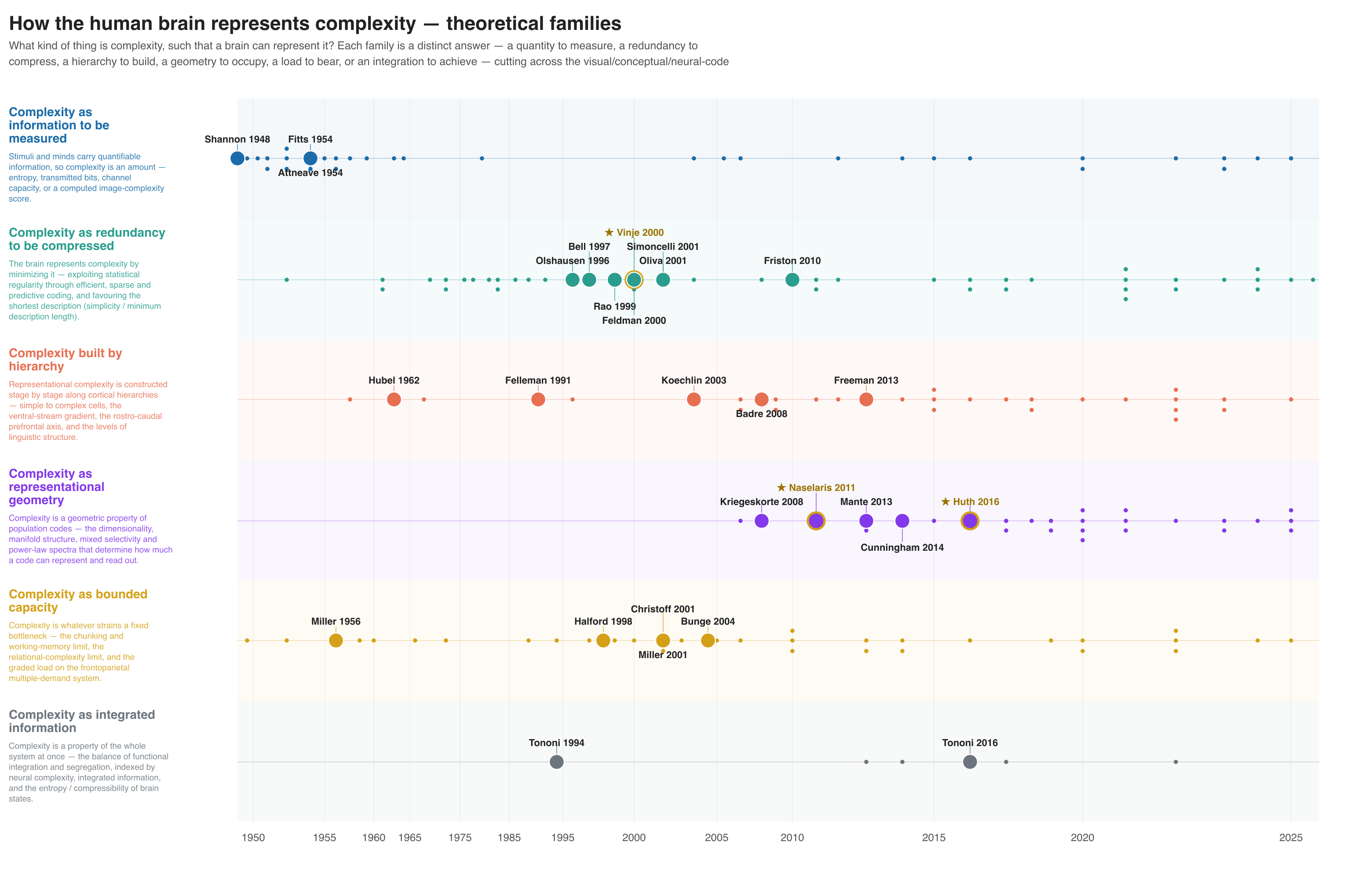
A timeline shows which ideas a field is built on, and when each appeared. Each lane is one family; each dot is one paper, placed by year. This review of how the brain represents complexity holds 190 papers.
| What you see | What it means |
|---|---|
| A horizontal lane | one family, with its claim at the left |
| A dot | one paper, placed by year |
| A larger dot | a more-cited paper |
| A hollow dot | a paper with no citation count available, not a count of zero |
| A solid, labeled dot | a landmark: highly cited, or often cited by the other papers in the review |
| A ring and a star | a paper from your own lab, when you ask for that |
| What you do | What happens |
|---|---|
| Hover over a dot | shows the paper's reference |
| Click a dot | opens the reference, summary, citation counts and a link |
| Hover over a lane name | shows the family's full claim and history |
| Press Next and Prev, or the arrow keys | steps through the papers in date order |
Recent papers draw small because they have had less time to be cited. Keep that in mind when you compare dot sizes.
Step 8. Ask for more
When the review is done, you can keep going in the same conversation:
| You want | Ask something like |
|---|---|
| A written review | "write the review paper" |
| A written review that argues a question | "write the review paper, and end with a debate, pro and con, on whether layers are functionally important" |
| An answer from the papers | "are there any human anatomy studies in this review?" |
| A separate analysis of one part | "summarize this just for fMRI, broken out by approach" |
| More papers on one subtopic | "add about 20 papers on cerebello-thalamic projections" |
| The same review with a newer toolkit | "rerun this search with the new code" |
A written review is drafted by the agent from the papers' abstracts, not their full texts. Every citation in it is checked against the review's papers, and the draft says plainly that an AI wrote it.
If something goes wrong
| What happens | What to do |
|---|---|
| The agent says a key is missing, but you set it | Put the export lines in ~/.zshenv (Step 2) and restart Claude Code |
| The agent stops because the daily allowance is used up | Get an OpenAlex key, or let it resume after midnight UTC |
| The review is much bigger or smaller than you wanted | Say so, with a number; the agent can cap or widen it |
| A paper is in the wrong family, or does not belong | Tell the agent which paper and why; it corrects the row |
| A result looks wrong | Say so, with one example; the agent checks the rest |
For the details of any step, see How it works.